
- name
- Malgel
- kind
- Markdown editor and previewer
- written in
- Rust, on GPUI Kit
- runs on
- macOS 11+, Windows 10+, Linux
Malgel
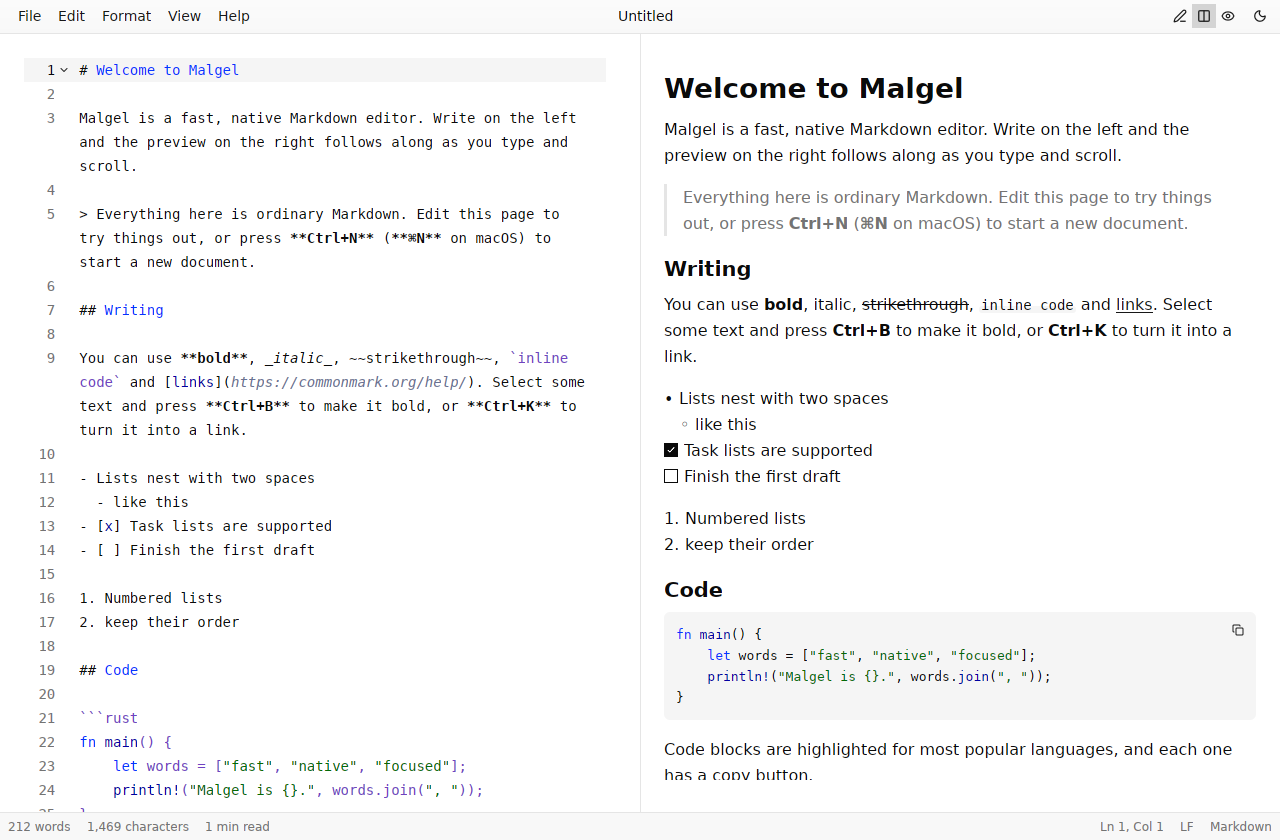
A fast, native Markdown editor. Write on the left and the preview on the right follows along as you type and scroll. Pure Rust, no browser inside, and instant with multi-megabyte files.
Download Malgel Source on GitHub
Tip
This page is a Markdown document, shown the way Malgel shows one. Press 2 (or the split icon at the top right) to see the source beside the preview, then edit it: the preview keeps up. Ctrl+Shift+O jumps to any heading.
Editor and preview, side by side
A syntax-highlighted editor with line numbers, soft wrap, multi-cursor editing, find & replace and undo history, next to a live GitHub-flavored preview.
- Two-way scroll sync. Scroll or type in the editor and the preview stays on the same block. Scroll the preview and the editor follows to the matching source line. Whichever pane you are pointing at leads, so the two never fight.
- Three layouts. Editor only, editor and preview, or preview only (Ctrl+1/2/3). Single-pane layouts center a comfortable reading column.
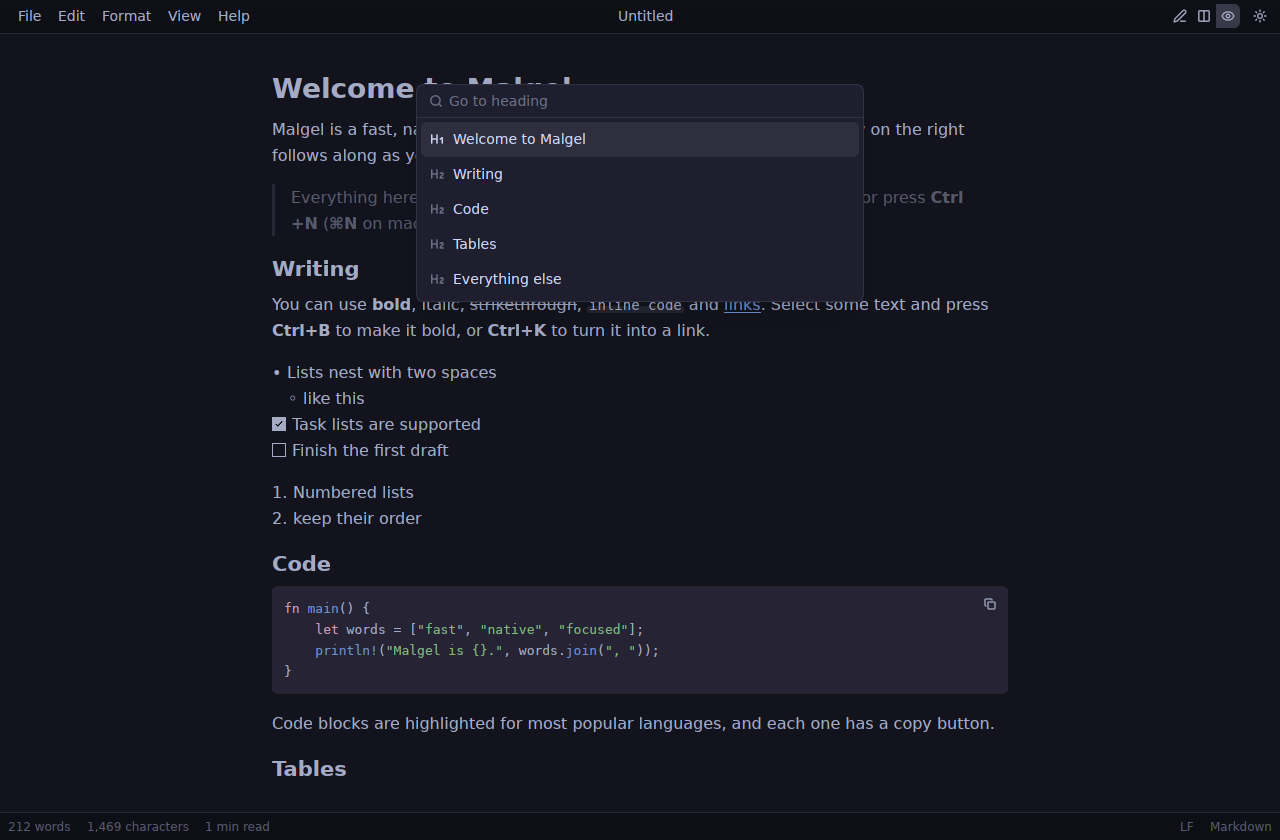
- Go to heading. An outline palette (Ctrl+Shift+O) jumps to any heading.
- Live statistics. Words (CJK-aware), characters, reading time, caret position and selection size, in the status bar at the bottom.
Everything Markdown does, rendered properly
Tables, task lists, strikethrough, YAML front matter as a property list, local and remote images, and fenced code highlighted for 28 languages, each block with a copy button.
Notes that keep their shape
- Ship the editor
- Write the docs
- Getting started
- Keyboard shortcuts
| Phase | Weeks |
|---|---|
| Design | 2 |
| Build | 6 |
Enter continues a list item, task or quote, and ends the list on an empty item. Tab and Shift+Tab nest and un-nest items with their children, and numbered lists renumber themselves. In tables, Tab moves between cells and keeps the columns aligned, and Enter adds a row.
GitHub alerts
Note
Useful information that users should know, even when skimming content.
Tip
Helpful advice for doing things better or more easily.
Important
Key information users need to know to achieve their goal.
Warning
Urgent info that needs immediate user attention to avoid problems.
Caution
Advises about risks or negative outcomes of certain actions.
A plain quote stays a quote:
Simplicity is prerequisite for reliability.
Math, typeset in pure Rust
Euler's identity links five constants, and the area of a circle is . Prices like $5 and $10 stay text.
LaTeX is translated to Typst math and laid out by the Typst compiler with its New Computer Modern Math font. Formulas sit on the text baseline, follow the theme's text color, and render on a background thread.
Diagrams without a browser
Flowcharts, sequence, class, state and ER diagrams, Gantt charts, pies, mindmaps, git graphs, timelines and journeys, drawn in pure Rust by merman in a few milliseconds and in the theme's colors. A mistake shows the parser's message under the source instead of a blank.
Code
fn main() {
    let words = ["fast", "native", "focused"];
    println!("Malgel is {}.", words.join(", "));
}Formatting that follows the keyboard
Bold, italic, strikethrough, inline code, links, headings, quotes, lists and code blocks: each one toggles, and works on the selection or the word under the caret. Select some text and press Ctrl+B to make it bold, or Ctrl+K to turn it into a link.
- Smart paste. Paste or drop an image and Malgel saves it in an
assetsfolder next to the document and links it. Paste a URL over selected text to link the text. - Copy as rich text (Ctrl+Alt+C). The selection, or the whole document, goes on the clipboard as formatted HTML with formulas and local images embedded, and the Markdown as the plain-text alternative.
Nothing lost
- Unsaved changes are written aside a second after you stop typing, and come back after a crash.
- Files changed by another program reload by themselves. With unsaved edits, Malgel asks which version to keep.
- A file moved or deleted underneath you stays open as unsaved.
- The last session reopens on launch: documents, caret positions, folder and window.
- Atomic saves, UTF-8 with byte-order-mark handling, and CRLF files stay CRLF.
Export as HTML, PDF and Word
All three render alerts, math and diagrams as the preview does, embed local images, and work offline.
| Format | What you get |
|---|---|
| HTML | A standalone, self-styled page that follows the reader's light or dark preference, with formulas and diagrams embedded as SVG. |
| Typeset in-process by Typst: Libertinus Serif, vector math and diagrams, footnotes, repeating table headers, and US Letter or A4 by locale. | |
| Word | Real heading styles, so the navigation pane works. Word lists and footnotes, tables with repeating headers, alerts as shaded boxes, formulas and diagrams as sharp images. |
Themes
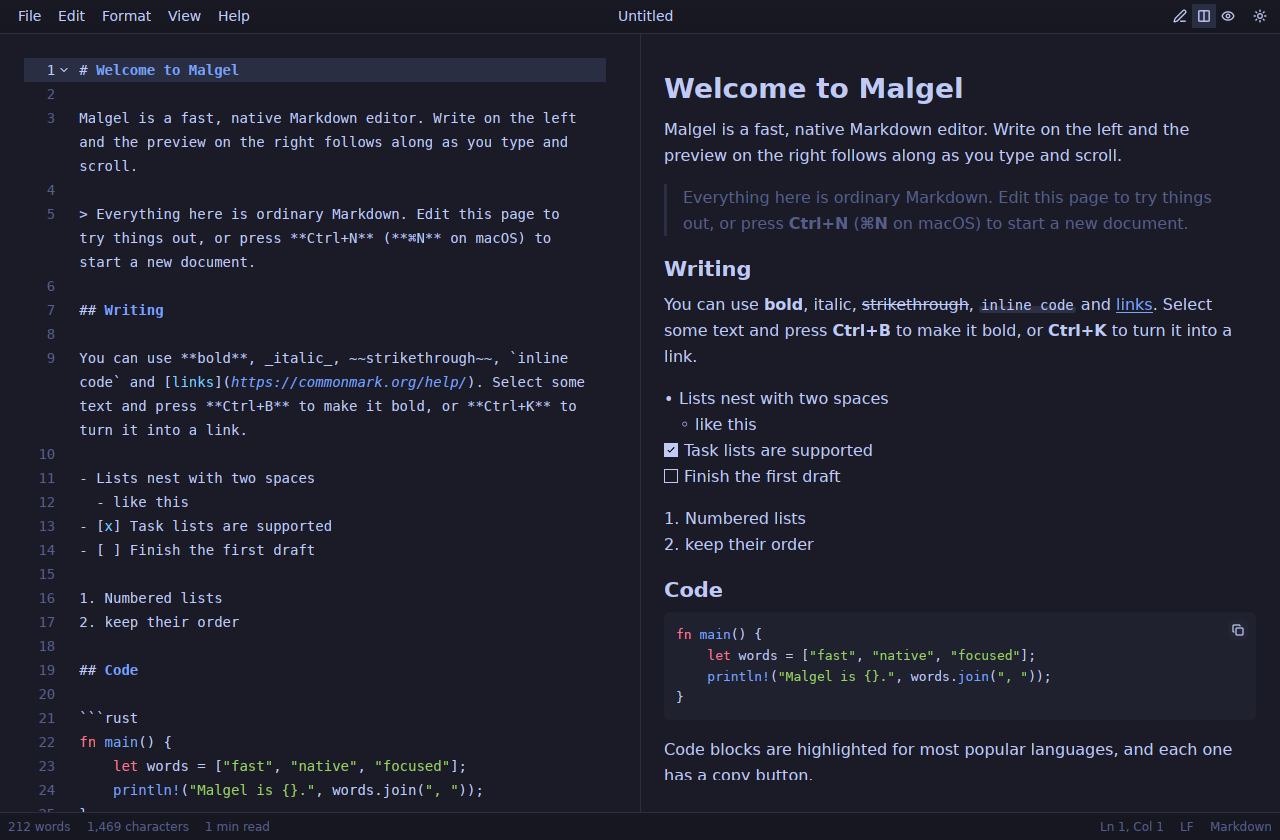
Light, dark or follow the system, with a theme picked separately for each. Click one to wear it on this page:
| Family | Light | Dark |
|---|---|---|
| Default | Light | Dark |
| Ayu | Ayu Light | Ayu Dark |
| Catppuccin | Latte | Frappe, Macchiato, Mocha |
| Everforest | Everforest Light | Everforest Dark |
| Flexoki | Flexoki Light | Flexoki Dark |
| Gruvbox | Gruvbox Light | Gruvbox Dark |
| macOS Classic | Classic Light | Classic Dark |
| Solarized | Solarized Light | Solarized Dark |
| Tokyo Night | Night, Storm, Moon |
Ctrl+= and Ctrl+- zoom the entire interface, not just the text. Ctrl+Shift+L switches between light and dark.
| Tokyo Night | Outline palette on Catppuccin Mocha |
|---|---|
|  |
More, when you want it
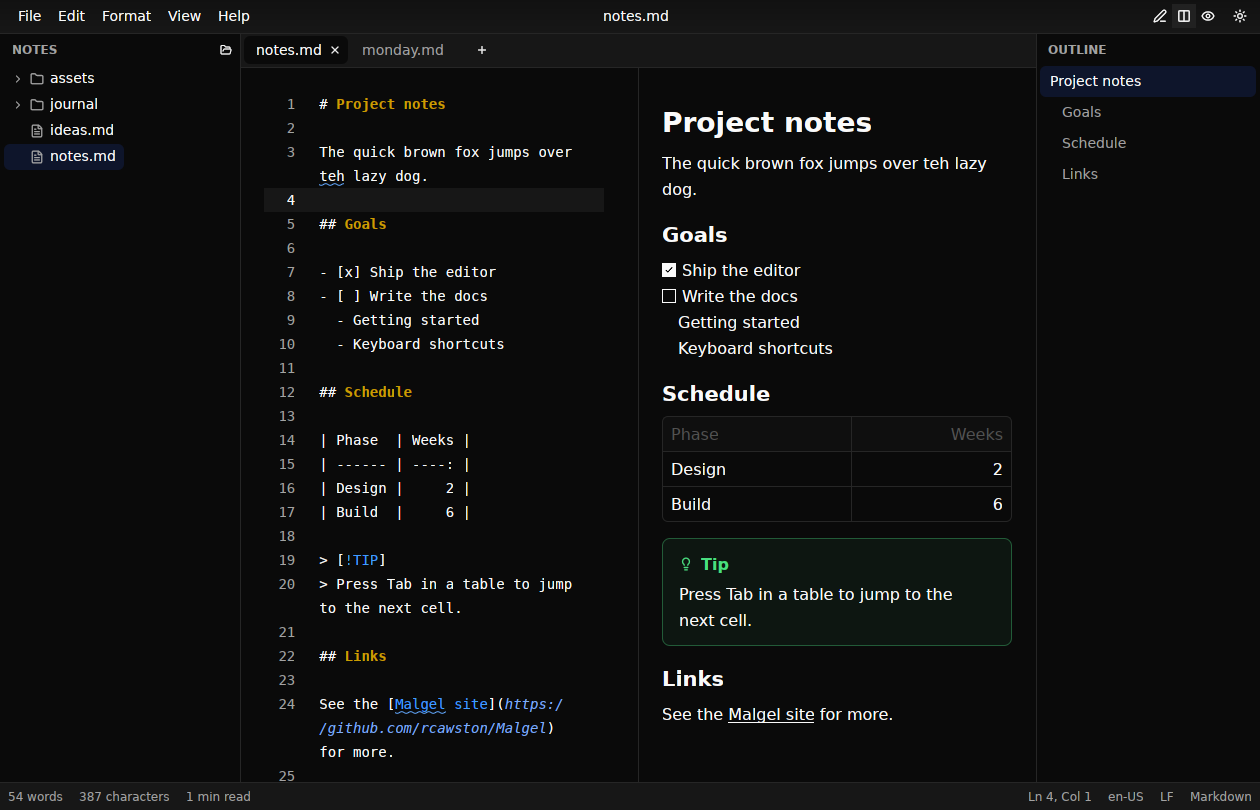
Out of the box Malgel is a focused single-document editor. Everything below stays off until you turn it on in Settings (Ctrl+,) or the View menu.
- Tabs. Open documents side by side. Ctrl+Tab and Ctrl+Shift+Tab switch between them.
- File sidebar (Ctrl+Shift+B). A folder's Markdown and text files as a tree that follows changes on disk.
- Outline (Ctrl+Alt+O). The document's headings beside the editor, with the section you are in highlighted.
- Spell check. Unknown words are underlined in prose, skipping code, math, URLs and front matter. American English is built in, and any Hunspell dictionary works.
- Focus mode (Ctrl+Shift+F, Esc to leave). Only the text, larger and centered, with everything but the current paragraph faded.
Fast, because it is native
On a software-rendered Linux VM the window appears in about 150 ms, and typing into a 1.5 MB document keeps pace with the keyboard.
- The editor is rope-backed: edits, layout and painting touch only the visible lines.
- The preview parses on a background thread. Bursts of keystrokes coalesce into one parse, and only the visible blocks are laid out and painted.
- Statistics, the outline and the scroll-sync index come from one debounced background pass. Results from stale revisions are dropped.
- The UI redraws only when state changes. The one periodic job is a metadata check on open files every two seconds.
Install
Download Malgel from the releases page.
- macOS 11+ (Apple silicon and Intel): open the
.dmgand drag Malgel to Applications. - Windows 10+: run the
-setup.exeinstaller, which also adds Malgel to "Open with" for Markdown files, or unzip the portableMalgel.exe. - Linux x86_64: make the
.AppImageexecutable and run it, or unpack the tarball into~/.local.
tar -xzf malgel-*-linux-x86_64.tar.gz -C ~/.local --strip-components=1Note
Builds made without signing certificates are unsigned (ad-hoc signed on macOS). RELEASING.md explains how to open them.
Build from source
Malgel needs a recent stable Rust toolchain. On Linux, install the libraries GPUI needs first:
sudo apt install libfontconfig-dev libwayland-dev libxkbcommon-x11-dev \
libx11-xcb-dev libssl-dev libzstd-dev libvulkan1Then:
git clone https://github.com/rcawston/Malgel && cd Malgel
cargo run --release                 # opens the welcome document
cargo run --release -- notes.md # opens a fileKeyboard shortcuts
Ctrl is ⌘ on macOS.
| Command | Shortcut |
|---|---|
| New, Open, Save, Save as | Ctrl+N, Ctrl+O, Ctrl+S, Ctrl+Shift+S |
| Editor / Editor and preview / Preview | Ctrl+1 / Ctrl+2 / Ctrl+3 |
| Go to heading | Ctrl+Shift+O |
| Find, Replace | Ctrl+F, Ctrl+H |
| Bold, Italic, Strikethrough | Ctrl+B, Ctrl+I, Ctrl+Shift+X |
| Inline code, Link, Code block | Ctrl+E, Ctrl+K, Ctrl+Shift+C |
| Heading 1 to 6 | Ctrl+Alt+1 to Ctrl+Alt+6 |
| Quote, Bulleted, Numbered, Task list | Ctrl+Shift+., Ctrl+Shift+8, Ctrl+Shift+7, Ctrl+Shift+9 |
| File sidebar, Outline, Focus mode | Ctrl+Shift+B, Ctrl+Alt+O, Ctrl+Shift+F |
| Export as HTML, Copy as rich text | Ctrl+Shift+E, Ctrl+Alt+C |
| Switch light and dark | Ctrl+Shift+L |
Acknowledgements
Built on GPUI from Zed Industries and GPUI Kit by Longbridge. The bundled themes come from GPUI Kit (Apache-2.0). The American English dictionary is from SCOWL via wooorm/dictionaries. Mermaid diagrams are drawn by merman, a Rust implementation of Mermaid.
Happy writing.